删除 Windows 11 中资源管理器左侧的主文件夹和图库
Windows Registry Editor Version 5.00

[HKEY_CURRENT_USER\Software\Classes\CLSID\{e88865ea-0e1c-4e20-9aa6-edcd0212c87c}]
"System.IsPinnedToNameSpaceTree"=dword:00000000

[-HKEY_LOCAL_MACHINE\SOFTWARE\Microsoft\Windows\CurrentVersion\Explorer\Desktop\NameSpace\{f874310e-b6b7-47dc-bc84-b9e6b38f5903}]
解决打开游戏时出现“无法打开此“ms-gamingoverlay“链接”弹窗问题
-
打开运行(Win+R),并输入 regedit 命令,按确定或回车
-
定位如下位置:
HKEY_CURRENT_USER\SOFTWARE\Microsoft\Windows\CurrentVersion\GameDVR
找到 AppCaptureEnabled 这个键值,把值改为 0
- 定位如下位置:
HKEY_CURRENT_USER\System\GameConfigStore
找到 GameDVR_Enabled 这个键值,把值改为 0
解决 ping localhost 时为 ipv6 地址
解决方法
请在管理员权限的 cmd 或 powershell 中运行
先查一下前缀优先级:
netsh interface ipv6 show prefixpolicies
Querying active state...

Precedence  Label  Prefix
----------  -----  --------------------------------
        50      0  ::1/128
        40      1  ::/0
        35      4  ::ffff:0:0/96
        30      2  2002::/16
         5      5  2001::/32
         3     13  fc00::/7
         1     11  fec0::/10
         1     11  3ffe::/16
         1     3   ::/96
上面的输出中 ::/0 是 IPv6 的前缀,需要调低优先级,低于 ::ffff:0:0/96、::/96 这些 IPv4 的前缀即可。
依次执行:
netsh int ipv6 set prefix ::/96 50 0
netsh int ipv6 set prefix ::ffff:0:0/96 40 1
netsh int ipv6 set prefix 2002::/16 35 2
netsh int ipv6 set prefix 2001::/32 30 3
netsh int ipv6 set prefix ::1/128 10 4
netsh int ipv6 set prefix ::/0 5 5
netsh int ipv6 set prefix fc00::/7 3 13
netsh int ipv6 set prefix fec0::/10 1 11
netsh int ipv6 set prefix 3ffe::/16 1 12
再次查询:
Querying active state...

Precedence  Label  Prefix
----------  -----  --------------------------------
        50      0  ::/96
        40      1  ::ffff:0:0/96
        35      2  2002::/16
        30      3  2001::/32
        10      4  ::1/128
         5      5  ::/0
         3     13  fc00::/7
         1     12  3ffe::/16
         1     11  fec0::/10
前缀含义
Windows 10/11 的访问前缀规则参照 RFC6724: Default Address Selection for Internet Protocol Version 6 (IPv6) 实现。可参考 IANA IPv6 Special-Purpose Address Registry 查看这些前缀的归属。
一些优化
请在管理员权限的终端中运行
禁用动态时钟
禁用动态时钟可以减少系统中断,提升性能稳定性:
bcdedit /set disabledynamictick yes
禁用最后访问时间戳
禁用 NTFS 文件系统的最后访问时间戳更新,减少磁盘写入:
fsutil behavior set disableLastAccess 1
禁用 8.3 短文件名
禁用 NTFS 的 8.3 短文件名生成,提升文件系统性能:
fsutil behavior set disable8dot3 1
优化 Windows Defender 性能
设置扫描占用的 CPU 比例
查看当前的 CPU 占用比例,默认一般是 50
Get-MpPreference | select ScanAvgCPULoadFactor
调整 CPU 占用比例,例如设置为 20
Set-MpPreference -ScanAvgCPULoadFactor 20
关闭映射磁盘文件扫描
Set-MpPreference -DisableScanningNetworkFiles 1
Set-MpPreference -DisableScanningMappedNetworkDrivesForFullScan 1
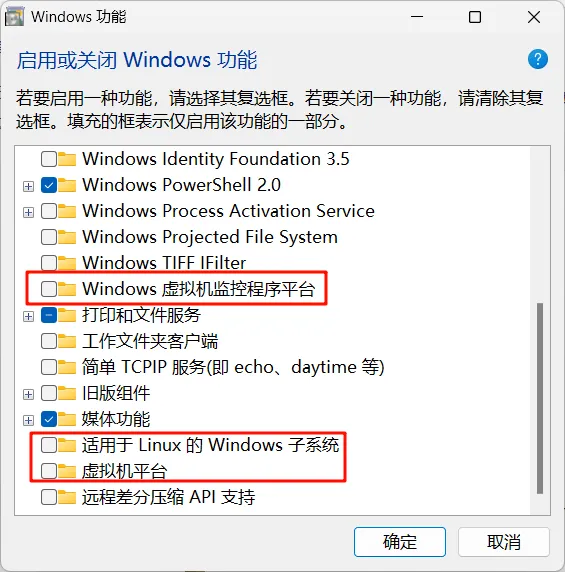
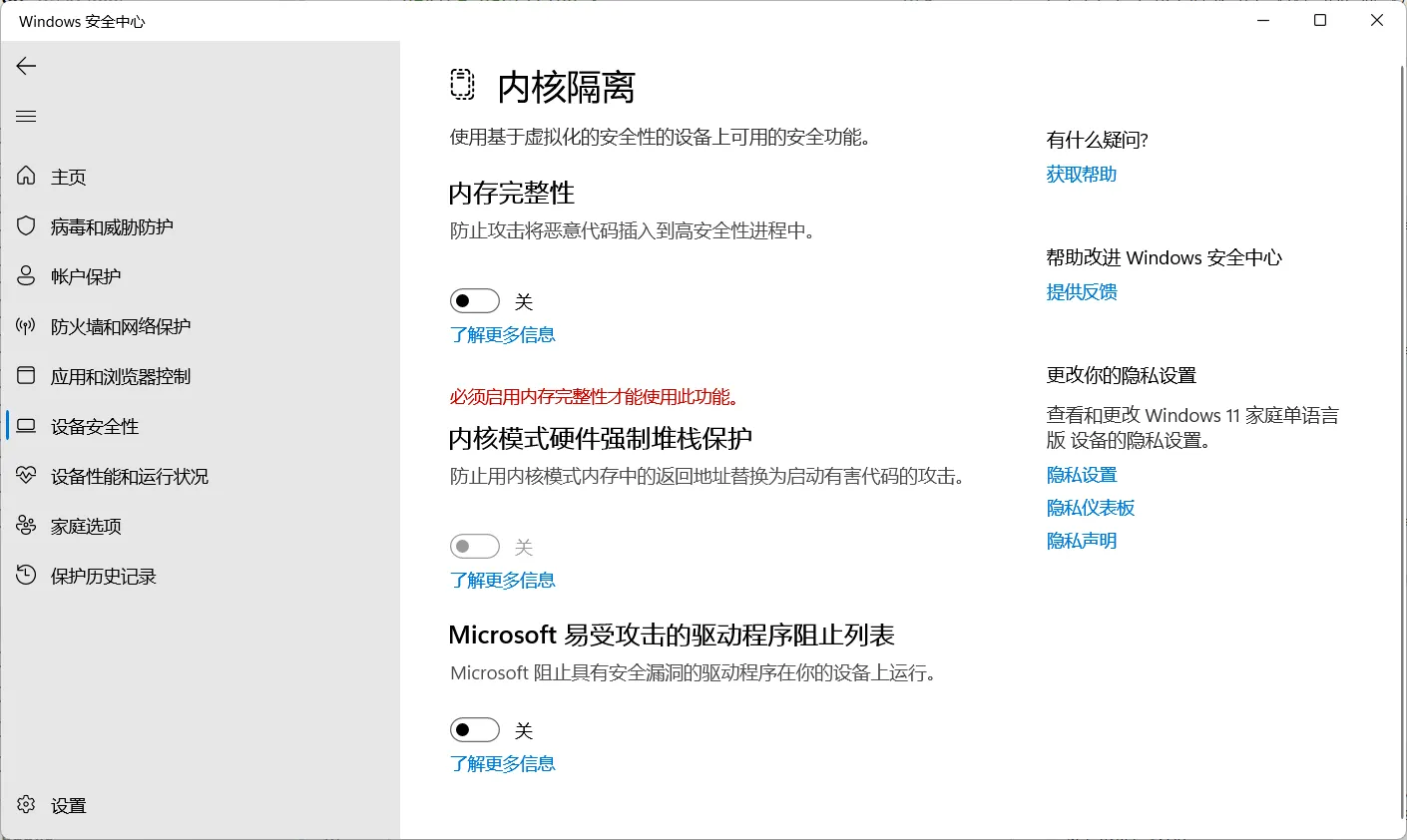
彻底关闭 Hyper-V、WSL、Device Guard、Credential Guard
关闭下列基于虚拟化的相关服务和模块以提升性能
注意: WSL2、Docker Desktop、Podman Desktop 等基于 Hyper-V 的软件将无法工作
反正我不用这些软件
关闭 Hyper-V 以及相关服务
首先在管理员终端中关闭 Hyper-V
Disable-WindowsOptionalFeature -Online -FeatureName Microsoft-Hyper-V-Hypervisor
bcdedit /set hypervisorlaunchtype off
再进入 Windows 功能关闭其他功能
关闭内存完整性
关闭 Device Guard
进入注册表
HKEY_LOCAL_MACHINE\SYSTEM\CurrentControlSet\Control\DeviceGuard

EnableVirtualizationBasedSecurity = 0
RequirePlatformSecurityFeatures = 0
关闭 Credential Guard
进入注册表
HKEY_LOCAL_MACHINE\SYSTEM\CurrentControlSet\Control\Lsa

LsaCfgFlags = 0
HKEY_LOCAL_MACHINE\SOFTWARE\Policies\Microsoft\Windows\DeviceGuard

LsaCfgFlags = 0
进入管理员 CMD
bcdedit /set vsmlaunchtype off
mountvol X: /s
copy %WINDIR%\System32\SecConfig.efi X:\EFI\Microsoft\Boot\SecConfig.efi /Y
bcdedit /create {0cb3b571-2f2e-4343-a879-d86a476d7215} /d "DebugTool" /application osloader
bcdedit /set {0cb3b571-2f2e-4343-a879-d86a476d7215} path "\EFI\Microsoft\Boot\SecConfig.efi"
bcdedit /set {bootmgr} bootsequence {0cb3b571-2f2e-4343-a879-d86a476d7215}
bcdedit /set {0cb3b571-2f2e-4343-a879-d86a476d7215} loadoptions DISABLE-LSA-ISO,DISABLE-VBS
bcdedit /set {0cb3b571-2f2e-4343-a879-d86a476d7215} device partition=X:
mountvol X: /d
重启电脑后会提示关闭 Credential Guard,按 Win + F3 确认
参考:https://learn.microsoft.com/zh-cn/windows/security/identity-protection/credential-guard/configure?tabs=reg
安装开启 Hyper-V
pushd "%~dp0"
dir /b %SystemRoot%\servicing\Packages\*Hyper-V*.mum >hyper-v.txt
for /f %%i in ('findstr /i . hyper-v.txt 2^>nul') do dism /online /norestart /add-package:"%SystemRoot%\servicing\Packages\%%i"
del hyper-v.txt
Dism /online /enable-feature /featurename:Microsoft-Hyper-V-All /LimitAccess /ALL
重新编译 .NET Framework 机器码
$env:PATH = [Runtime.InteropServices.RuntimeEnvironment]::GetRuntimeDirectory()
[AppDomain]::CurrentDomain.GetAssemblies() | ForEach-Object {
    $path = $_.Location
    if ($path) {
        $name = Split-Path $path -Leaf
        Write-Host -ForegroundColor Yellow "`r`n$name"
        ngen.exe install $path /nologo
    }
}
清除图标缓存
taskkill /f /im explorer.exe
cd /d %userprofile%\AppData\Local\Microsoft\Windows\Explorer
attrib -h iconcache_*.db
del iconcache_*.db /a
cd /d %userprofile%\AppData\Local
del IconCache.db /a
start explorer.exe
echo 执行完成
安装开启组策略
@echo off
pushd "%~dp0"
dir /b C:\Windows\servicing\Packages\Microsoft-Windows-GroupPolicy-ClientExtensions-Package~3*.mum >List.txt
dir /b C:\Windows\servicing\Packages\Microsoft-Windows-GroupPolicy-ClientTools-Package~3*.mum >>List.txt
for /f %%i in ('findstr /i . List.txt 2^>nul') do dism /online /norestart /add-package:"C:\Windows\servicing\Packages\%%i"
pause
PowerShell 配置
$Env:POWERSHELL_UPDATECHECK = "LTS"

$MaximumHistoryCount = 500

if (-not (Get-Module -Name PSReadLine)) {
	Import-Module PSReadLine
}
Set-PSReadLineKeyHandler -Key "Tab" -Function MenuComplete
Set-PSReadlineKeyHandler -Key "Ctrl+d" -Function ViExit
Set-PSReadLineKeyHandler -Key "Ctrl+z" -Function Undo
Set-PSReadLineKeyHandler -Key UpArrow -Function HistorySearchBackward
Set-PSReadLineKeyHandler -Key DownArrow -Function HistorySearchForward

function Get-DirectoryNameOnly { (Get-ChildItem).Name }
function Invoke-Path { param($Path = '.'); Invoke-Item $Path }
Set-Alias -Name ls -Value Get-DirectoryNameOnly -Option AllScope -Force
Set-Alias -Name ll -Value Get-ChildItem -Option AllScope -Force
Set-Alias -Name open -Value Invoke-Path -Option AllScope

Set-Alias -Name pn -Value pnpm -Option AllScope

function wis {
	winget search @args
}
function wii {
	winget install @args
}

function setproxy {
    $proxy = 'http://127.0.0.1:7890'
    $Env:HTTP_PROXY = $proxy
    $Env:HTTPS_PROXY = $proxy
    $Env:ALL_PROXY = 'socks5://127.0.0.1:7890'
    $Env:NO_PROXY = '127.0.0.1,localhost'
    Write-Host "代理已启用: $proxy" -ForegroundColor Green
}

function unsetproxy {
    $Env:HTTP_PROXY = $null
    $Env:HTTPS_PROXY = $null
    $Env:ALL_PROXY = $null
    $Env:NO_PROXY = $null
    Write-Host "代理已关闭" -ForegroundColor Yellow
}

#setproxy

function openhistory {
    $historyPath = Join-Path -Path $Env:APPDATA -ChildPath "Microsoft\Windows\PowerShell\PSReadLine\ConsoleHost_history.txt"
    if (Test-Path $historyPath) {
        notepad $historyPath
    } else {
        Write-Warning "History file not found at $historyPath"
    }
}

function cca {
	claude --settings $HOME/.claude/settings.a.json @args
}
Set-Alias -Name cc -Value claude -Option AllScope

function cx {
  codex --yolo @args
}

Invoke-Expression (&starship init powershell)
PowerShell 删除到回收站
替换默认的 rm 命令,将文件删除到回收站而非永久删除:
function Remove-ItemToRecycleBin {
    [CmdletBinding(DefaultParameterSetName='Path')]
    param(
        [Parameter(Mandatory=$true, ValueFromPipeline=$true, ValueFromPipelineByPropertyName=$true, Position=0)]
        [Alias('FullName')]
        [string[]]$Path,

        [Alias('r')]
        [switch]$Recurse,

        [Alias('f')]
        [switch]$Force
    )

    begin {
        $shell = New-Object -ComObject Shell.Application
    }

    process {
        foreach ($itemPath in $Path) {
            $resolvedPaths = Resolve-Path -Path $itemPath -ErrorAction SilentlyContinue

            if (-not $resolvedPaths) { continue }

            foreach ($rPath in $resolvedPaths) {
                $fullPath = $rPath.ProviderPath
                if (Test-Path $fullPath -PathType Container) {
                    if (-not $Recurse -and (Get-ChildItem $fullPath -ErrorAction SilentlyContinue)) {
                        Write-Error "项 $fullPath 包含项,若要删除,请指定 -Recurse 参数。"
                        continue
                    }
                }
                $parentDir = Split-Path $fullPath
                $itemName = Split-Path $fullPath -Leaf
                $folder = $shell.NameSpace($parentDir)
                $item = $folder.ParseName($itemName)

                if ($item) {
                    $item.InvokeVerb("delete")
                }
            }
        }
    }
}
if (Get-Alias rm -ErrorAction SilentlyContinue) {
    Remove-Item alias:rm -Force
}
Set-Alias -Name rm -Value Remove-ItemToRecycleBin